Binary Search — The Algorithm That Keeps Showing Up Everywhere
Binary search is one of those algorithms that looks trivially simple until you try to implement it from memory at 2am. Then suddenly you’re off by one, your loop runs forever, and you’re questioning your career choices.
Let’s fix that permanently.
The Core Idea
Binary search works on sorted arrays. Instead of scanning every element (O(n)), it repeatedly halves the search space until it finds the target — or confirms it doesn’t exist.
“The most fundamental idea in computer science: divide and conquer. Binary search is its purest form.”
Every iteration, you eliminate half the remaining candidates. This gives us O(log n) time — meaning a sorted array of 1 billion elements takes at most ~30 comparisons.
The Algorithm — 4 Languages
Python
def binary_search(arr: list[int], target: int) -> int:
    left, right = 0, len(arr) - 1

    while left <= right:
        mid = left + (right - left) // 2  # avoids integer overflow

        if arr[mid] == target:
            return mid
        elif arr[mid] < target:
            left = mid + 1
        else:
            right = mid - 1

    return -1  # not found

# Example
nums = [1, 3, 5, 7, 9, 11, 13, 15]
print(binary_search(nums, 7))   # → 3
print(binary_search(nums, 6))   # → -1
JavaScript
function binarySearch(arr, target) {
  let left = 0;
  let right = arr.length - 1;

  while (left <= right) {
    const mid = Math.floor((left + right) / 2);

    if (arr[mid] === target) return mid;
    if (arr[mid] < target) left = mid + 1;
    else right = mid - 1;
  }

  return -1;
}

const nums = [1, 3, 5, 7, 9, 11, 13, 15];
console.log(binarySearch(nums, 7));  // 3
console.log(binarySearch(nums, 6));  // -1
Java
public class BinarySearch {
    public static int binarySearch(int[] arr, int target) {
        int left = 0, right = arr.length - 1;

        while (left <= right) {
            int mid = left + (right - left) / 2;

            if (arr[mid] == target) return mid;
            else if (arr[mid] < target) left = mid + 1;
            else right = mid - 1;
        }

        return -1;
    }

    public static void main(String[] args) {
        int[] nums = {1, 3, 5, 7, 9, 11, 13, 15};
        System.out.println(binarySearch(nums, 7));  // 3
        System.out.println(binarySearch(nums, 6));  // -1
    }
}
C++
#include <iostream>
#include <vector>
using namespace std;

int binarySearch(vector<int>& arr, int target) {
    int left = 0, right = arr.size() - 1;

    while (left <= right) {
        int mid = left + (right - left) / 2;

        if (arr[mid] == target) return mid;
        else if (arr[mid] < target) left = mid + 1;
        else right = mid - 1;
    }

    return -1;
}

int main() {
    vector<int> nums = {1, 3, 5, 7, 9, 11, 13, 15};
    cout << binarySearch(nums, 7) << endl;  // 3
    cout << binarySearch(nums, 6) << endl;  // -1
    return 0;
}
Why mid = left + (right - left) / 2 ?
You’ll see this pattern in every language above. Why not just (left + right) / 2?
Because left + right can overflow if both are large integers. In C++ and Java, int maxes at ~2.1 billion. Two large indices summed will wrap around to a negative number — classic bug that only shows up at scale.
The safe version avoids the addition altogether by computing the offset from left.
# Dangerous (overflow risk in low-level languages)
mid = (left + right) // 2

# Safe always
mid = left + (right - left) // 2
Visual Walkthrough
Searching for 7 in [1, 3, 5, 7, 9, 11, 13, 15]:
Step 1: left=0, right=7, mid=3 → arr[3]=7 → arr[3]=7 ✓ FOUND
Searching for 6 in the same array:
Step 1: left=0, right=7, mid=3 → arr[3]=7  → 6 < 7  → right=2
Step 2: left=0, right=2, mid=1 → arr[1]=3  → 6 > 3  → left=2
Step 3: left=2, right=2, mid=2 → arr[2]=5  → 6 > 5  → left=3
Step 4: left=3 > right=2 → EXIT → return -1
Image Reference
Here’s how you’d include an image in your posts — this references a local file under /images/:
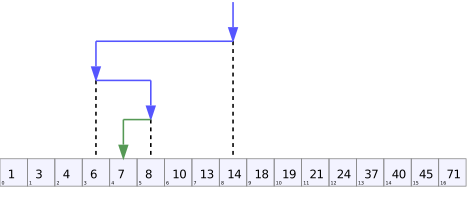
Binary search repeatedly halves the search space until the target is found or eliminated.
Common Variations
Find First Occurrence
When duplicates exist and you want the leftmost match:
def find_first(arr: list[int], target: int) -> int:
    left, right = 0, len(arr) - 1
    result = -1

    while left <= right:
        mid = left + (right - left) // 2
        if arr[mid] == target:
            result = mid
            right = mid - 1  # keep searching left
        elif arr[mid] < target:
            left = mid + 1
        else:
            right = mid - 1

    return result
Find Last Occurrence
def find_last(arr: list[int], target: int) -> int:
    left, right = 0, len(arr) - 1
    result = -1

    while left <= right:
        mid = left + (right - left) // 2
        if arr[mid] == target:
            result = mid
            left = mid + 1  # keep searching right
        elif arr[mid] < target:
            left = mid + 1
        else:
            right = mid - 1

    return result
Edge Cases to Never Forget
| Case | What happens |
|---|---|
| Empty array | left=0, right=-1 → loop never runs → returns -1 |
| Single element, matches | mid=0 → found immediately |
| Single element, no match | Loop exits → returns -1 |
| Target smaller than all | right keeps shrinking → exits cleanly |
| Target larger than all | left keeps growing → exits cleanly |
| Duplicates | Standard search returns any match — use first/last variants for specific one |
Where It Actually Shows Up
You’d be surprised. Binary search isn’t just “find element in sorted array.” It shows up disguised as:
git bisect— finds the commit that introduced a bug by binary searching commit history- Database indexes — B-trees are binary search, generalized to disk pages
- Square root calculation — search the answer space between 0 and n
- LeetCode “minimum/maximum that satisfies condition” — almost always binary search on the answer
- Spell checkers — sorted dictionary lookup
- IP routing tables — longest prefix match via binary search
The Mental Model
Every time you see: “given a sorted structure, find something efficiently” — think binary search first.
And more broadly: any time the answer space is monotonic — meaning once a condition becomes true it stays true — you can binary search the answer, not just the array.
That insight unlocks an entire class of problems that don’t look like binary search until you see it.
Key Takeaways
- Always use
left + (right - left) / 2for mid — never overflow - Loop condition is
left <= right(not<) - After the loop,
leftpoints to the insertion point — useful by itself - Think beyond arrays: binary search the answer space, not just arrays
- When you see O(log n) in a problem constraint — it’s a hint
One algorithm. Infinite applications.